
A private word with your teammate
You’re reading a conversation and there’s something you want your AI teammate to know. The rate to quote. A detail about this person. “Don’t mention the promotion yet.” None of it belongs in front of the Contact.
So the compose bar has a second destination. Same box, same thread — one tap decides whether your words reach the Contact or only your team.
Two places one message can go
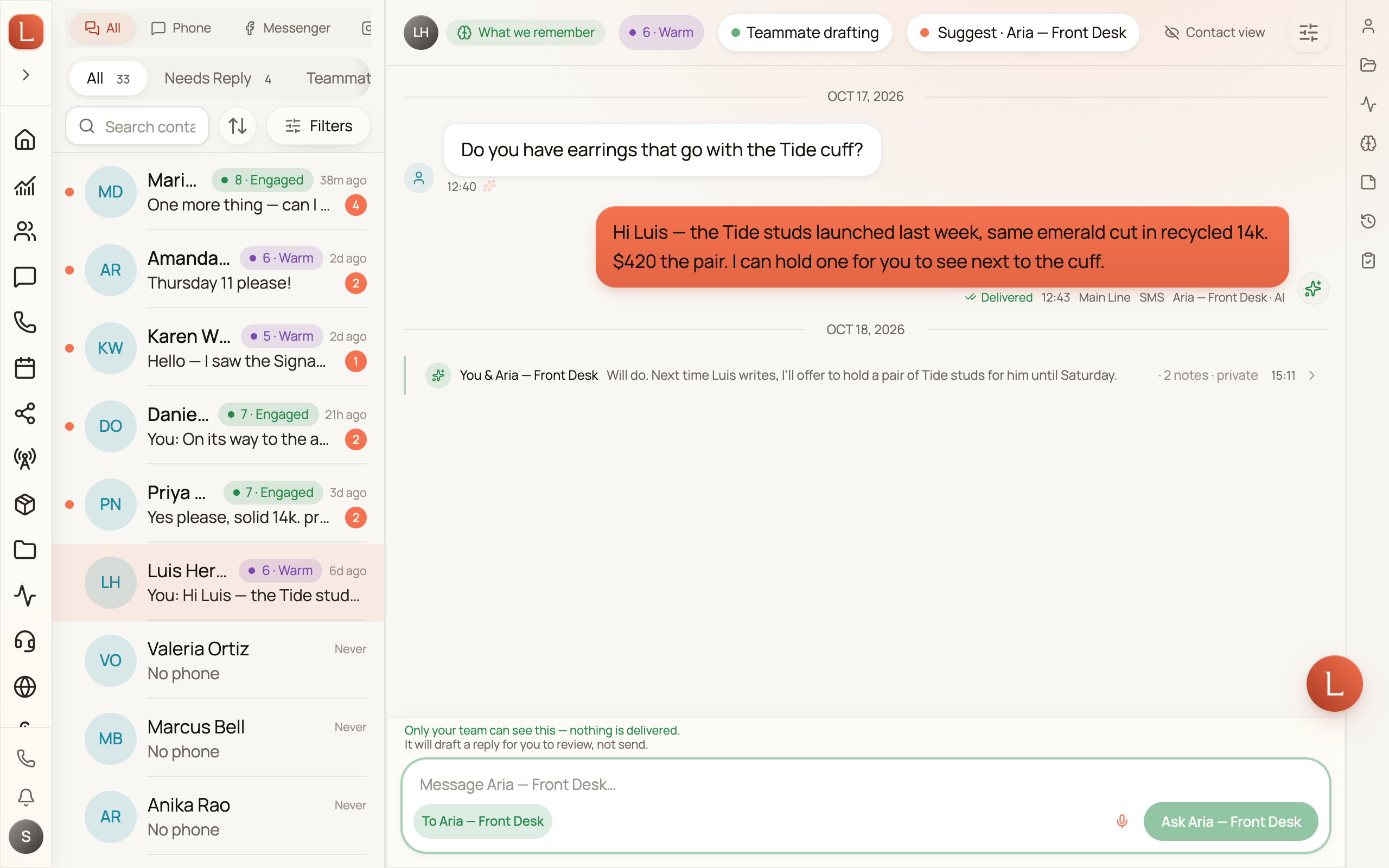
Section titled “Two places one message can go”A destination chip sits beside the message box. By default it reads To Ana Ruiz · Email — the Contact, on the channel you’re using.
Tap it and it flips to To Clara. The whole card changes with it: a green border, a green send button now labelled Ask Clara, the placeholder becomes Message Clara…, and a green line above the box reads Only your team can see this — nothing is delivered. Tap the chip again to go back.
The destination resets to the Contact after every send, so there’s no mode to forget you’re in.
Type @ to reach them faster
Section titled “Type @ to reach them faster”Type @ at the very start of the message and a small picker opens above the box, listing the teammate handling this Contact. Under the name it says Handling this contact · followed by what they can do right now.
The first row is already selected, so @Cl then Enter is enough. Arrow keys move, Enter picks, Esc dismisses the picker and keeps your draft exactly as typed — the @ included. While a name is on offer the send button is off, so a half-typed @Cl can never reach the Contact.
The picker follows the name, not the @. Type past the point where anything matches — @alluringplasticsurgery, a social handle — and the picker closes, the send button comes back on, and the line goes to the Contact as ordinary text, @ and all. Only a leading @ ever addresses your teammate: “I think @Clara should handle this” goes to the Contact like anything else.
If nobody is handling this Contact yet, a lone @ still opens the picker to say so — Nobody is assigned to Ana yet. — with a Choose a teammate button that opens the Responding teammate control right there. The send button stays on, so a message that simply starts with @ reaches the Contact like any other.
What your teammate will do with it
Section titled “What your teammate will do with it”While the destination is your teammate, a second line above the box — just under the green one — tells you the outcome. It is one of four:
- It’s paused for this contact — it won’t act on this.
- You’re driving, so it will draft a reply for you rather than send.
- It can reply to the contact on its own.
- It will draft a reply for you to review, not send.
The second one is the common case. Replying to a Contact in your own words takes the wheel, and that’s usually the state you’re in when you reach for the side channel — so your teammate drafts and waits for you, whatever its autonomy setting says.
What appears in the thread
Section titled “What appears in the thread”Private messages never look like a sent message. They sit in an inset green lane headed Between you and your team, followed by · not delivered · Ana Ruiz can’t see this.
Inside the lane your own lines read You and your teammate’s carry its name, each with a time. A back-and-forth groups into one lane rather than stacking. A long message collapses, with Show more and Show less to open and close it.
Your teammate can start one too
Section titled “Your teammate can start one too”It doesn’t only answer. Your teammate can raise something without being asked — she’s asked about parking twice, want me to include the garage instructions? — and it appears under its name in the same lane, waiting for you.
When we double-check before sending
Section titled “When we double-check before sending”If the newest thing in the thread is your teammate’s private message and you reply without tapping the chip, Loquent stops the send once and reads it back to you:
This goes to Ana Ruiz on Email — they’ll see it.
Clara spoke last, so we’re checking. — followed by your message, in quotes.
There are three choices: Send to Ana, Send to Clara instead, and Cancel. Escape cancels and keeps your draft. Answer it — send, re-route, or cancel — and it stays shut until your teammate speaks privately again. Change your draft instead of answering and it returns on your next send. It never appears once you’ve used the chip yourself.
Asking it to send for you
Section titled “Asking it to send for you”You can also ask your teammate to send something to the Contact from the private lane — @Clara send her an apology about the billing mix-up. Your teammate writes the message, reads the whole thing back to you in the lane, and stops there. Reply looks good, go ahead and it sends exactly what you saw. Reply make it shorter — or anything it can’t read as a clear yes — and it drafts again instead of sending. Only a plain approval sends.
This is the rule whenever you’re driving or your teammate is in Suggest mode. An Autonomous teammate with nobody holding the conversation still sends straight away.
Handing the wheel back in a sentence
Section titled “Handing the wheel back in a sentence”Tell your teammate to take over and they will — take the wheel, you can take over now, all yours, @Clara handle it from here. There is no phrase to remember: your teammate reads what you meant, so your own words work, with or without the @.
A centred line then appears in the lane reading Clara is driving again, and the outcome line above the box updates to match.
When you’re only giving background — I’ve got a call now — or telling them what to do next time, the wheel stays with you. If your teammate can’t tell which you meant, it leaves the conversation with you and says so rather than guessing; the header pill hands it back in one tap.
Private from your Contact, not from your team
Section titled “Private from your Contact, not from your team”Anyone on your team who can open this Contact’s conversation sees these messages and who wrote each one. Writing one needs permission to manage the teammate handling that Contact; reading only needs access to the Contact.
Nothing here is delivered anywhere — no text, no email, no DM — and it never counts as a reply to the Contact.
Next: turn on Contact view in one thread per Contact to read the thread exactly as your Contact did, see who’s replying to a Contact, or tell your team something once and let it remember.