
Answer your teammate's questions
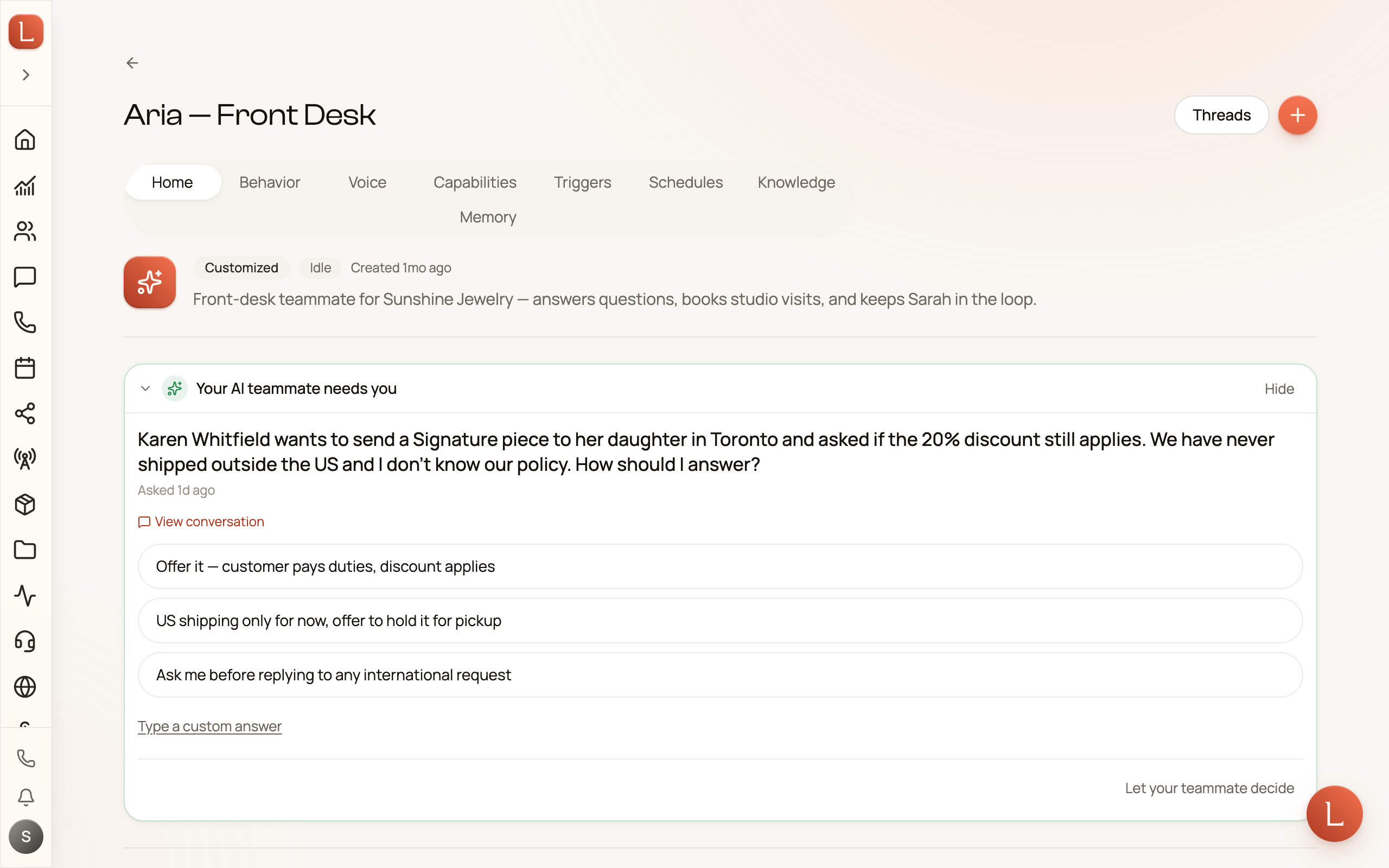
Your AI teammate handles the routine on its own. But some decisions are yours to make — a discount to approve, a request that falls outside its instructions. When that happens, it doesn’t guess. It pauses and asks you, in plain language. Answering is usually one tap.
These questions are called escalations. This page is how you work through them. For the bigger picture of how drafts and escalations fit together, see drafts, approvals, and escalations.
Where the questions show up
Section titled “Where the questions show up”A question appears as a card headed “Your AI teammate needs you” — right in the conversation where it came up, and gathered onto the teammate’s Home page so you can answer without hunting. It also pings your phone the moment it’s raised, as long as that teammate’s notify on escalation setting is on.
Two limits shape the queue. A teammate holds the conversation for about six hours waiting on you; past that it stops waiting and wraps up as best it can, so a Contact is never left in silence. And it will never stack more than five open questions on one Contact at a time.
The three kinds of question
Section titled “The three kinds of question”Every question comes with the right controls for the answer it needs:
- Yes or no. Two buttons — tap one.
- A short choice. Up to three options, each a tappable pill. Pick the one that fits.
- An open question. A text box where you type a sentence. Press enter or the send button.
Whatever the shape, there’s also a Type a custom answer link if the buttons don’t quite cover it — tap it and write your own reply instead.
When several are waiting
Section titled “When several are waiting”If a teammate has more than one question for you, they don’t pile up as separate cards. They fold into a single stepper — 1 of N with progress dots — so you move through them one at a time.
-
Answer the first question. Your answer is staged, not sent yet, and the stepper advances to the next.
-
Work through the rest. Use the arrows to go back and change any answer before you commit — nothing is final until the last step.
-
Review and send. The final step lists every answer you staged. Tap Send N answers to your teammate and the whole batch goes at once.
This way you review your decisions together and commit them in one action, rather than firing off each one blind.
The escape hatch: let your teammate decide
Section titled “The escape hatch: let your teammate decide”Not every question truly needs you. Maybe it’s a judgment call you trust the teammate to make. Every question has a Let your teammate decide link — tap it and the teammate proceeds on its own best judgment instead of waiting. In the stepper, it skips that question and moves on. Nothing stalls.
Once you’ve cleared the queue, the card settles into a quiet marker: Your teammate is continuing the conversation. That’s your cue that the teammate is moving again.
You’ll find these same questions gathered on your Home page under What needs you, so you can clear them alongside everything else waiting on you — in whichever place you’re already looking.