
Notes and what your team remembers
A Contact’s profile holds more than their phone number. It also holds what’s been said and learned about them — some of it written by you, some of it picked up by your AI teammate as it talks with them. Open a Contact and you’ll find these under the Notes, Memory, and Activity tabs.
Notes: yours and your team’s
Section titled “Notes: yours and your team’s”The Notes tab is a running log of short write-ups about a Contact. Two kinds live here together:
- Notes you write. Tap to add one — a reminder, context, whatever you want on the record.
- Notes your team leaves. After a call, your teammate writes up what happened and drops it here, so you get the gist without listening back. Each note is labeled with where it came from.
You can search notes, filter them, and sort newest or oldest. A note you write yourself, you can edit or delete; a long one collapses with a Show more link so the list stays scannable.
Memory: what your team remembers
Section titled “Memory: what your team remembers”The Memory tab is different. It’s not notes — it’s the running set of facts your AI teammate has quietly gathered while texting and calling this person, headed What we remember.
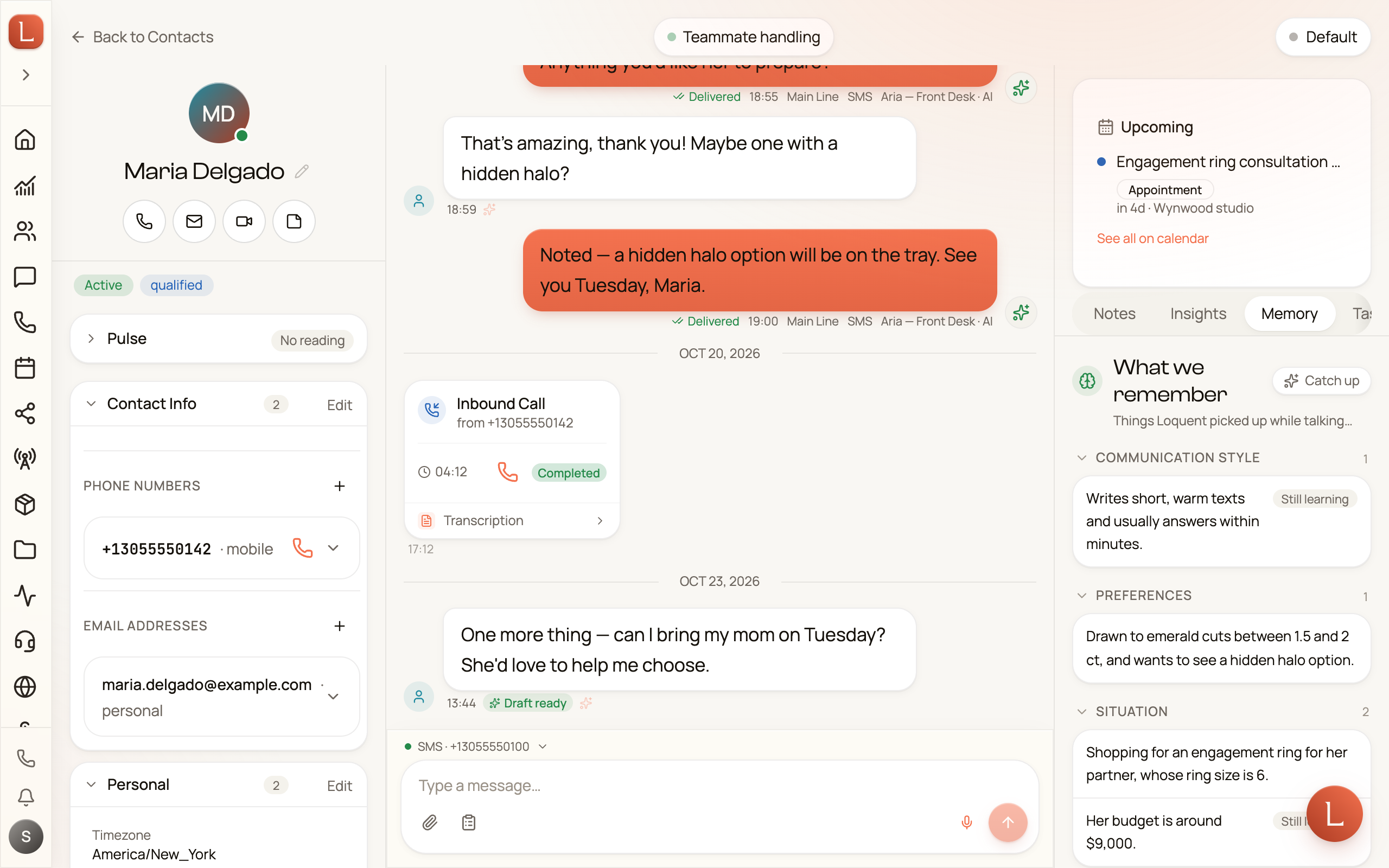
Think of it as the things a good assistant would just know after a few conversations: what this person cares about, a preference they mentioned, a detail worth not forgetting. The facts are grouped into plain categories, and your team keeps them current on its own — you don’t edit them.
A few cues to read:
- Still learning marks a fact your teammate isn’t fully sure of yet.
- Private or Only you marks something kept discreet — visible to you, not shared across the whole team.
Telling your teammate something directly
Section titled “Telling your teammate something directly”Notes you write and facts your teammate picks up on its own aren’t the only routes into this panel. Inside a Contact’s conversation you can also say something to your teammate privately — a steer, a correction, a detail it had no way to know. When what you told it should outlive that one conversation, your teammate saves it here itself.
Keep the three apart:
- A Note is written for people to read later.
- A private message is addressed to your teammate and steers what it does next.
- Memory is where a fact worth keeping ends up.
A private message isn’t remembered automatically. It stays part of the conversation record, and your teammate promotes it into Memory only when it’s worth keeping. See a private word with your teammate.
Catch up from history
Section titled “Catch up from history”If a Contact has months of messages but a thin memory — maybe they’re new to Loquent — tap Catch up from history. Your teammate reads back through the conversation and rebuilds what it should remember, filling the panel in one pass. A small Updating… cue shows while it works, and the facts appear when it’s done.
Activity: the full timeline
Section titled “Activity: the full timeline”The Activity tab pulls everything into one dated timeline — calls, notes, and tasks together, grouped by day, newest first. It’s the answer to “what’s the whole history with this person?” in a single scroll, without hopping between tabs.
Together these three tabs are how your team’s knowledge of a Contact compounds: every conversation leaves a note, sharpens the memory, and lands on the timeline — so the next time you or your teammate reaches out, you’re never starting cold. To see how that learning improves the replies your team drafts, read drafts, approvals, and escalations.