
How your team learns
Every time you tweak a reply before it goes out, or answer a question your AI teammate raised, you’re teaching it. Your team gets a little sharper each day — and none of that learning happens behind your back. This page shows what your team remembers, how it improves, and the controls that keep you in charge.
Two things a teammate keeps
Section titled “Two things a teammate keeps”Open Teammates from the sidebar, pick a teammate, and choose the Memory tab. You’ll see the two kinds of knowledge a teammate carries between conversations.
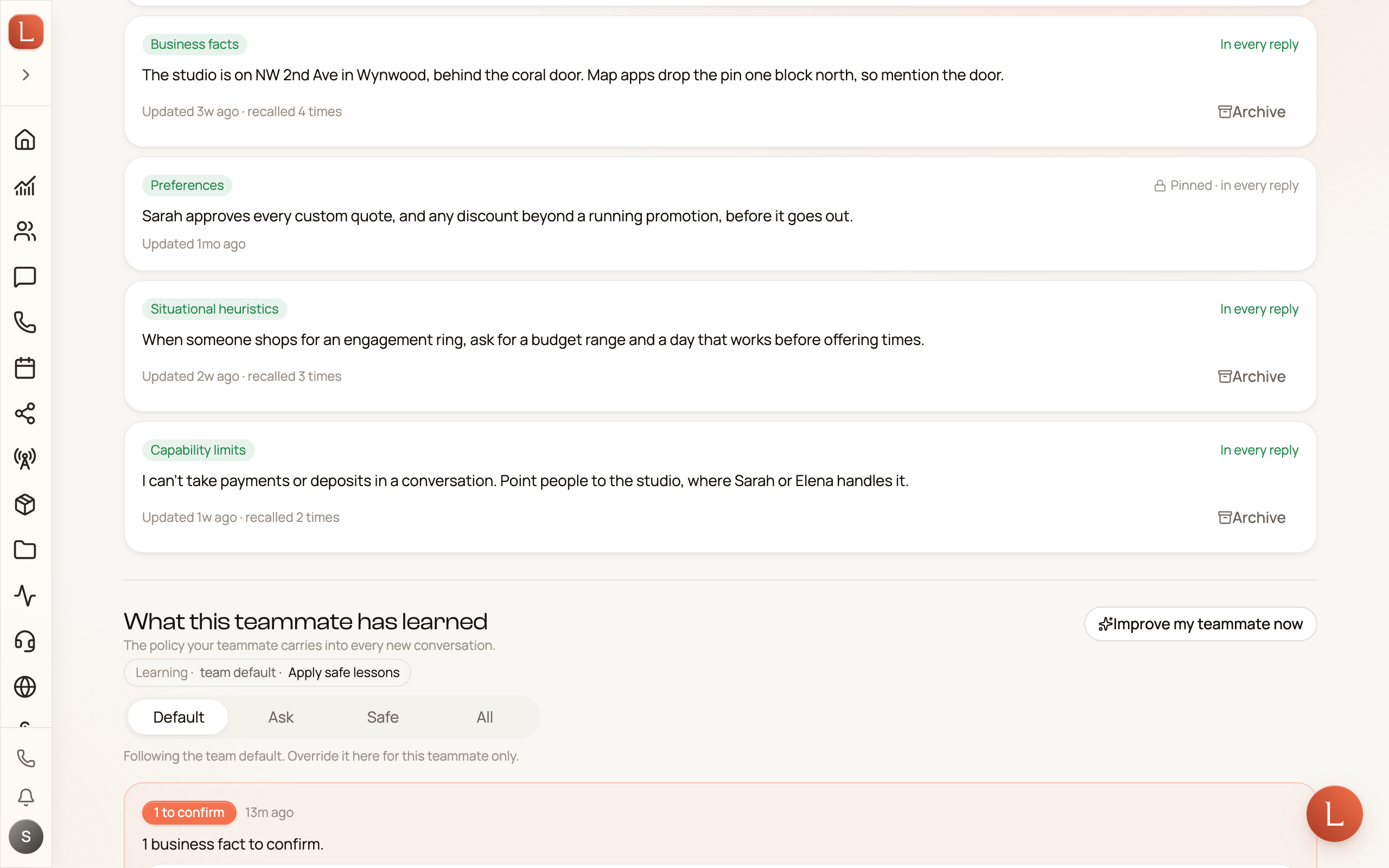
- Memory — short, durable facts your teammate should always know: how your business greets Contacts, your booking rules, a preference a Contact told you once. Each fact is a small card you can read, and the top of the section notes whether you or the teammate last edited it.
- What this teammate has learned — the section labeled with that heading is the policy your teammate builds from experience: the wording and judgment it picked up from your edits and answers. It’s the quiet reason next week’s drafts need less from you than this week’s.
Folding in older notes
Section titled “Folding in older notes”Teammates that have been with you a while may still carry notes from before memory was organized into cards — one long block of free text rather than the tidy facts above. When there’s something left to fold in, a Reconcile legacy memory button appears next to Edit at the top of the Memory section.
Tap it, confirm once, and Loquent reads those older notes, picks out the durable facts — about your business, your teammate’s persona, the preferences it should keep — and turns them into memory cards you can read and edit like any other. It only adds: nothing is removed, nothing is overwritten, and you can edit or delete anything it creates. If memory is already full, it tells you so — combine or trim a few cards and run it again.
It’s safe to run more than once. The older notes are kept as they are, so the button stays put, and a second run won’t re-add a fact that’s already in memory — if there’s nothing new left to lift, it simply tells you Nothing to fold. If you never see the button at all, this teammate has no older notes: its memory has been cards from the start.
How improvement happens
Section titled “How improvement happens”Two everyday actions feed learning, both covered in drafts, approvals, and escalations:
-
You edit a draft before sending. Your change is the signal — the teammate learns your phrasing and your call.
-
You answer a question. When a teammate escalates a decision and you reply, that answer teaches it what to do next time.
You can also ask for a refresh on demand: the Improve my teammate now button folds recent lessons into the policy right away, instead of waiting for the next batch.
Choose what waits for you
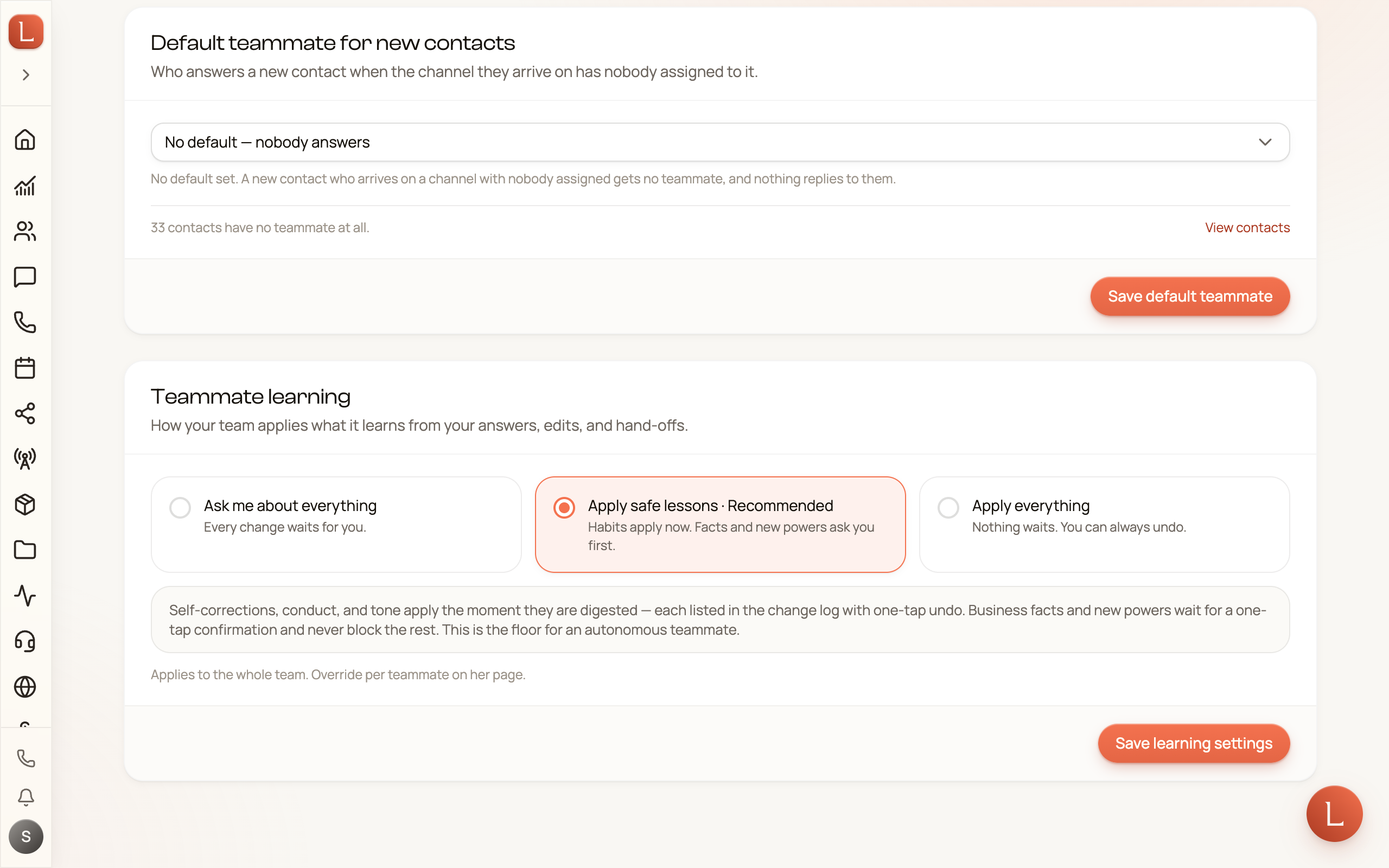
Section titled “Choose what waits for you”You decide how much of what your team learns waits for your OK. Set it for your whole team under Teammates → Config, in the Teammate learning card, which offers three choices:
- Ask me about everything — every change waits for you.
- Apply safe lessons — the default, marked Recommended. Habits apply now: self-corrections, conduct, and tone. Business facts and new powers ask you first.
- Apply everything — nothing waits. You can always undo.
Pick one and tap Save learning settings.
To set a different choice for one teammate, open its Memory tab and, under What this teammate has learned, pick Ask, Safe, or All — or Default to follow the team. If the team choice is Apply everything, a teammate on Autonomous still applies only safe lessons until you pick All on its own page and confirm Apply everything.
A change that waits shows under What this teammate has learned, marked to confirm. You read it, then tap That’s right, Edit it first, or Not true. Nothing in it applies until you say so — the same Suggest-first rhythm as the autonomy dial.
You don’t have to remember to go looking, either: the moment a change is waiting, you get a notification — in the app, and by email or push depending on the channels you’ve picked for that type. See notifications to choose how it reaches you.
Undo anything, pin what must never change
Section titled “Undo anything, pin what must never change”Learning is always reversible. Under What your teammate learned on the Memory tab, every change is listed with a one-tap Undo. Changed your mind about a whole policy? Roll back to previous policy restores the last one.
And some things should never drift. In the Memory section, open Edit on any fact and switch on Pin — your teammate cannot change this. A pinned fact shows a small lock and reads Pinned; your teammate can lean on it but can never overwrite it. Use it for the non-negotiables — your hours, your prices, a promise you made a Contact.
That’s the balance: your team keeps getting better on its own, and you hold the undo, the choice of what waits for you, and the pin.