
Tool Configuration
Tools extend what your agent can do during a call. Each tool is configured per agent, so different agents can have different capabilities. Open an agent and scroll to the Tools section to configure them.
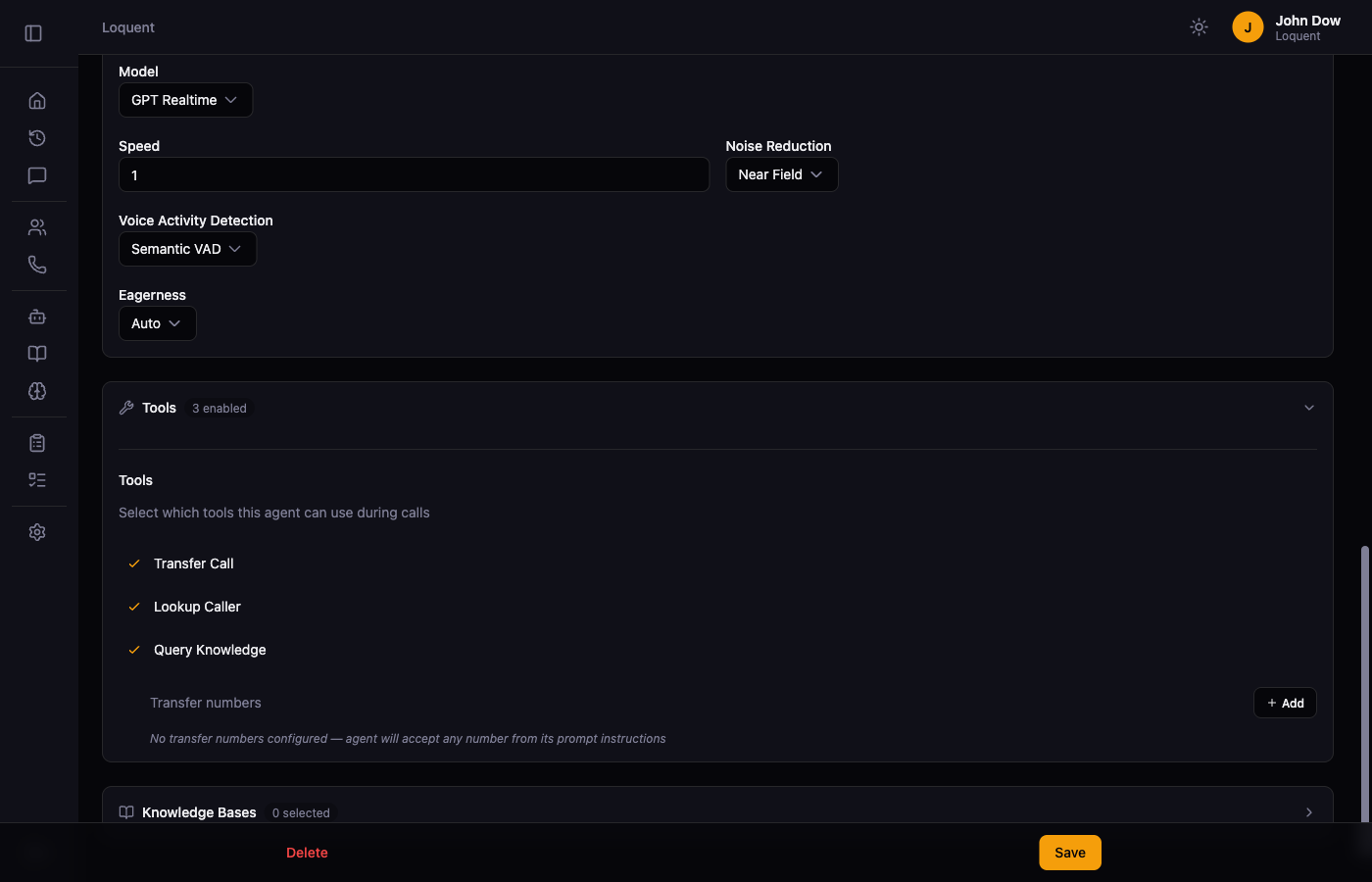
Available tools
Section titled “Available tools”Transfer Call
Section titled “Transfer Call”Lets the agent hand off an active call to a human phone number mid-conversation. Enable it and add one or more Transfer numbers — the phone numbers the agent can redirect calls to.
Lookup Caller
Section titled “Lookup Caller”Lets the agent query your CRM integration during a call to retrieve caller information. Requires Integrations to be configured.
Query Knowledge
Section titled “Query Knowledge”Lets the agent search your knowledge base to answer questions during a call. The agent uses this automatically when a caller asks a question it doesn’t know from its instructions alone.
Enable or disable a tool
Section titled “Enable or disable a tool”Click a tool’s checkbox to toggle it on or off. The header shows a count of enabled tools (e.g. 3 enabled). Changes take effect after you click Save.
Related pages
Section titled “Related pages”- Instruction Builder — write the instructions that govern when tools are used
- Knowledge Base — manage the content agents can search